Supermicro X10SRL-F for local AI: more GPU memory, with clear limits
A practical X10SRL-F assessment: PCIe lanes, DDR4 ECC, dual-GPU constraints and the real cost of building a VRAM-focused Ollama server.
In brief
- The X10SRL-F is an older single-socket server board; slots 4 and 6 are physically ×16 but electrically PCIe 3.0 ×8.
- System DDR4 is not GPU VRAM. Two 24 GB cards offer separate memory devices, not one universally usable 48 GB GPU.
- The supplied screenshot identifies an E5-2630 v4, but does not establish GPU compatibility, benchmark speed or board condition.
- Buy around the complete configuration: supported software, physical clearance, cooling, power and a measured workload.
What the supplied photos establish
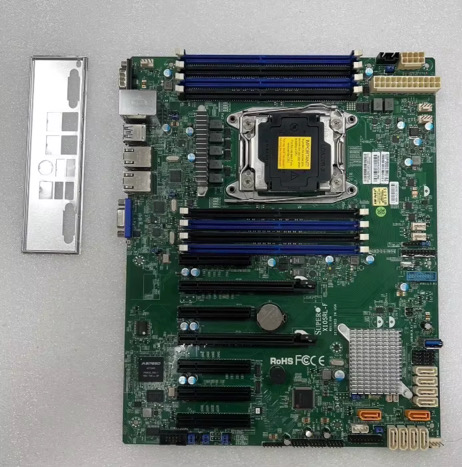
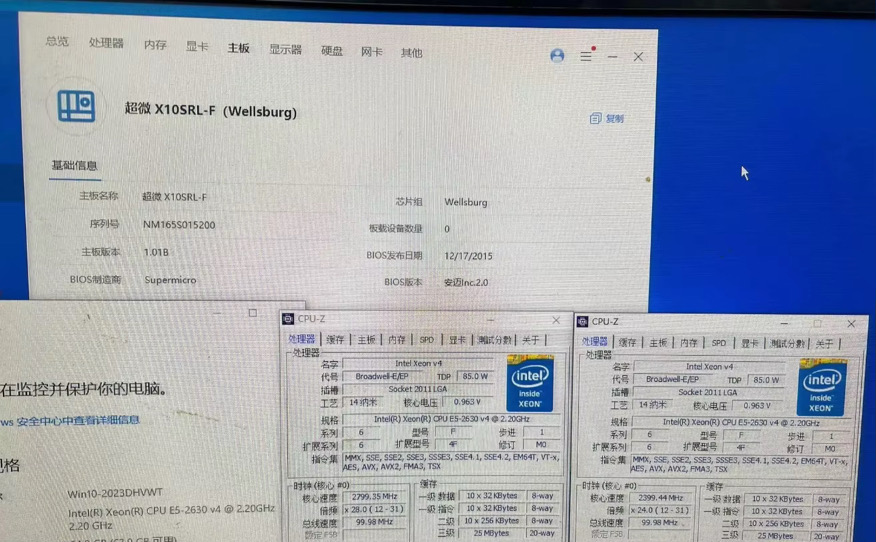
The motherboard photograph carries the X10SRL-F marking. The second image shows a system-information utility identifying a Supermicro X10SRL-F and CPU-Z identifying an Intel Xeon E5-2630 v4. Those are useful identification clues, not a witnessed hardware test. The screenshots cannot establish that both photographs depict the same physical unit, that every expansion slot works, or that the machine has successfully run Ollama. No GPU, VRAM measurement or inference benchmark is shown. The capture dates are unknown.
The Chinese-language utility also displays board revision 1.01B and a BIOS date of 17 December 2015. That date is not a BIOS version number. It does not prove the BIOS 2.0-or-newer requirement that Supermicro lists for v4 support. Request a current firmware-version screen and a successful boot with the intended processor before treating a used listing as a verified configuration. [1]
This is a document-based assessment reviewed on 3 November 2026, not a launch story or a hands-on review. The photographs supplied by the reader are reproduced without hardware retouching. The Chain Perspective watermark identifies the publication presentation; it does not assert that the publication took the photographs, owns the underlying product imagery or has tested the unit.
Why this platform can suit a VRAM-first build
Supermicro lists the X10SRL-F as discontinued. Its attraction for a homelab is the platform around the accelerator: an ATX board, one LGA2011-3 socket, eight DDR4 ECC memory slots, multiple expansion connections and remote management. It supports specified Xeon E5-1600 and E5-2600 v3/v4 processors, rather than arbitrary CPUs that happen to share an apparent socket name. The product specification gives a motherboard CPU thermal-design limit of 145 W; the enclosure must still dissipate the actual heat. [1]
Our assessment is conditional: an inexpensive, working board-and-memory bundle can leave more of the acquisition budget for GPU memory. The motherboard itself does not create VRAM or accelerate a model. Nor does a low listing price prove that the complete machine is inexpensive. Add the correct cooler, RAM, power supply, chassis, GPU cooling, storage and replacement-risk allowance before comparing platforms.
The relevant purchase question is therefore whether this complete system can keep the intended workload resident and deliver acceptable latency. A modest CPU with a well-supported accelerator may suit a personal inference service; an old platform with several troublesome cards can absorb its purchase savings in setup time. These are design tradeoffs, not measured performance claims about the photographed board.
The PCIe detail that changes the GPU plan
Supermicro explicitly confirms that slots 4 and 6 operate at ×8 even though their connectors accept ×16-length cards. A BIOS setting cannot turn either into an electrically ×16 slot. [3] The manufacturer's lane table also shows a shared allocation for slots 2 and 3: either ×4/×4, or slot 3 at ×8 with slot 2 unavailable. Slot 1 is a chipset-connected PCIe 2.0 ×4 connection, unlike the CPU-connected PCIe 3.0 slots. [2]
Do not translate seven connectors into seven usable large GPUs. The two full-length slots are a sensible starting point for a two-card layout, but cooler thickness, backplates, shrouds and power leads determine whether the cards can coexist. A card thicker than two slots can obstruct the other intended position. An extension riser changes mounting possibilities; it does not manufacture bandwidth or solve cooling and power delivery.
For a model that remains on one GPU, the interconnect has a different role from the GPU's own memory bandwidth. A split model, repeated model loading and CPU offload put different demands on the host link. We cannot assign a universal percentage penalty to ×8, or predict tokens per second from the lane count alone. Test the exact model, quantization, context length and concurrency. The table below is an electrical layout reference, not a GPU compatibility certification.
| Slot | Connection | Electrical lanes |
|---|---|---|
| 7 · nearest RAM | CPU · PCIe 3.0 | ×8 |
| 6 · full length | CPU · PCIe 3.0 | ×8 in ×16 connector |
| 5 | CPU · PCIe 3.0 | ×8 |
| 4 · full length | CPU · PCIe 3.0 | ×8 in ×16 connector |
| 3 | CPU · PCIe 3.0 | ×8 or ×4; shared with slot 2 |
| 2 | CPU · PCIe 3.0 | Disabled or ×4; paired with slot 3 |
| 1 · board edge | Chipset · PCIe 2.0 | ×4 in ×8 connector |
Slot 3 / slot 2 allocations are ×8 / disabled or ×4 / ×4. Connector length does not establish electrical bandwidth. Read the manual.
The E5-2630 v4 and DDR4: useful host resources, not extra VRAM
Intel specifies the E5-2630 v4 as a 10-core, 20-thread processor with a 2.20 GHz base clock, up to 3.10 GHz turbo and an 85 W TDP. It provides 40 PCIe 3.0 lanes and four memory channels, with DDR4-2133 as its highest listed memory speed. The motherboard's DDR4-2400 headline therefore does not promise 2400 operation with this particular CPU. Intel marks the processor as discontinued and its servicing updates as ended on 30 June 2022. TDP is not a wall-socket consumption measurement. [4]
Supermicro distinguishes memory types: up to 256 GB RDIMM, 512 GB LRDIMM, or 1 TB using supported 3DS LRDIMMs. These are platform ceilings subject to the specified CPU, firmware and qualified modules, not interchangeable promises for any DDR4 kit. [1] Use the board's tested-memory information and population guidance; its manual starts with A1, B1, C1 and D1. [2]
For a planning example, 4 × 32 GB gives 128 GB of host RAM and 8 × 32 GB gives 256 GB. Those are capacity calculations, not certified shopping lists. Host RAM serves the operating system, model loading and other services; it can also hold model data when software uses CPU offload. It does not become an equivalent extension of GPU-local memory. Buying hundreds of gigabytes of DDR4 to compensate for insufficient GPU memory changes the execution path, so benchmark that path explicitly.
Budget VRAM before choosing a second card
Start with a transparent lower-bound calculation: parameters × bits per stored weight ÷ 8. At an idealized four bits per weight, 8 billion parameters occupy 4 GB, 32 billion occupy 16 GB and 70 billion occupy 35 GB in decimal units. These figures exclude quantization metadata, higher-precision tensors, context/KV cache, runtime buffers and other allocations. Real model files and runtime requirements will be larger or otherwise differ from this simplified estimate. They are not a list of models guaranteed to fit.
As an intentionally hypothetical budget, reserve 3 GB of a nominal 24 GB device for everything outside weights. That leaves 21 GB for weights: enough for the idealized 32-billion calculation, but with no proof that a particular model, context or backend fits. The 3 GB reserve is an assumption to replace with measurement, not a recommended universal allowance. Keep GB and GiB consistent when comparing a vendor label with software output.
Ollama documents that it prefers a single GPU when the model fits there and distributes a model across available GPUs when it does not. [5] Two 24 GB devices can therefore make some larger workloads possible, but do not behave as one contiguous 48 GB GPU for every application. Per-device allocations, supported backends and scheduling still matter. Buy the second card to solve an observed capacity or throughput constraint, rather than expecting the memory labels alone to establish the outcome.
| Parameters | Ideal 4-bit weights | Before runtime overhead |
|---|---|---|
| 8 billion | 4 GB ≈ 3.73 GiB | Metadata, cache and buffers excluded |
| 32 billion | 16 GB ≈ 14.90 GiB | Metadata, cache and buffers excluded |
| 70 billion | 35 GB ≈ 32.60 GiB | Metadata, cache and buffers excluded |
GB = 10⁹ bytes; GiB = 2³⁰ bytes. These are calculations, not measured model requirements.
Older high-memory GPUs: software and cooling come first
A Tesla P40 illustrates the attraction and the hidden work. NVIDIA specifies 24 GB GDDR5, a 250 W maximum board-power limit, a dual-slot body and passive cooling that requires directed system airflow. Its auxiliary connector is CPU-style 8-pin; NVIDIA documents the approved power arrangements and adapter pinout. A connector that looks similar is not evidence that a random cable is suitable. The P40 is a worked example here, not a tested pairing or a buying recommendation. [7]
At this review, Ollama's hardware documentation lists the P40 at compute capability 6.1 and requires driver 570 or newer for capabilities 5.0–6.2. Its general NVIDIA requirement is driver 550 or newer for supported devices. The same page lists V100 at 7.0. These software requirements can change; confirm the exact operating-system, driver and Ollama combination before paying for older hardware. [6]
For any accelerator, obtain the precise part number and form factor. A product-family name alone cannot establish connector, memory capacity, cooling or motherboard fit. Compare a single supported high-memory PCIe card with two older cards using the complete installed cost. The latter configuration must also earn back its additional integration effort. In a room shared with people, evaluate noise under sustained load, not merely whether a fan can prevent an immediate thermal shutdown.
Firmware, storage and first boot
The X10SRL-F manual exposes Above 4G Decoding for supported 64-bit PCI address allocation. Check that setting when diagnosing accelerator resource-allocation problems; it is not a switch that combines VRAM or increases PCIe lanes. Record the existing configuration before changing it. [2] Supermicro's download page advises against indiscriminate BIOS or BMC flashing and warns that an incorrect firmware image can damage the system. Resolve the exact version requirement and recovery procedure before an update. [8]
The board provides ten SATA 6 Gb/s ports, two Gigabit Ethernet ports and a separate IPMI management port. [1] A SATA SSD is a straightforward starting point for a model store. If choosing PCIe storage instead, account for the slot it consumes and verify adapter and boot support separately; a successful GPU boot says nothing about an untested storage arrangement.
Our suggested bring-up sequence is deliberately incremental: start with the verified CPU, supported RAM, storage and one accelerator; confirm a stable operating system and GPU driver; run a small representative workload; then add the second GPU. Save configuration notes after each successful step. Keep management access on a trusted network rather than publishing IPMI directly to the internet. A used board should be accepted on evidence of its working functions, not the presence of a server-management label.
Power and ownership cost: calculate the whole system
Consider a planning case with two accelerators capped at 250 W each, an 85 W CPU allowance and an assumed 100 W for the rest of the system: 500 + 85 + 100 = 685 W of estimated component-side demand. The 100 W allowance is invented for this example, and the CPU's TDP is not a precise maximum input-power measurement. This arithmetic is not a PSU recommendation or a measurement of the pictured machine. It explains why choosing a supply from GPU wattage alone is insufficient.
A hypothetical 750 W supply would have only 65 W of nameplate difference against that 685 W estimate. Check the supply's actual 12 V capability, connector allocation, transient handling, cable compatibility and thermal operating conditions. Obtain the GPU manufacturer's connection requirements rather than improvising adapters. PSU conversion losses also mean wall power and the sum of component DC estimates are different quantities.
Electricity cost is easier to express once wall power is measured. An assumed 100 W average running continuously uses 876 kWh per year; at an illustrative €0.30/kWh, that is €262.80. A 200 W average doubles those figures. The tariff and operating profile are examples, not a claim about local prices. For another illustration, saving €250 on acquisition is erased after 10,000 running hours by an extra measured 100 W at €0.25/kWh—about 417 days of continuous operation. This sensitivity calculation helps decide whether a cheap platform remains cheap for the intended duty cycle.
| Average wall power | Energy per year | Cost per year |
|---|---|---|
| 100 W | 876 kWh | €262.80 |
| 200 W | 1,752 kWh | €525.60 |
| 400 W | 3,504 kWh | €1,051.20 |
Assumed power and tariff. Measure your actual duty cycle; these are not X10SRL-F test results.
A repeatable acceptance test for the finished server
Write an acceptance sheet before buying: the exact workload, required context length, expected simultaneous requests and the longest tolerable response delay. A system for occasional document questions and a continuously loaded multi-user service are different projects. Do not infer a concurrency guarantee from CPU thread count or total installed VRAM.
NVIDIA's nvidia-smi -L lists GPU identities. Its query tools report supported measurements such as memory use, temperature and power; unsupported fields can return N/A. Capture the driver version and monitor the devices during a sustained workload, while using a separate wall-power meter for total system demand. [9] Use ollama ps to check whether a loaded model is wholly on GPU or partly on CPU. Ollama also documents additional memory pressure from parallel contexts, so repeat the test at the intended concurrency. [5]
The Ollama generation API provides load duration, prompt-evaluation counts/duration and generated-token counts/duration. Generation throughput can be calculated as eval_count / eval_duration × 1,000,000,000 when duration is in nanoseconds. Record cold loading separately from warm inference. [10] Add client-observed time to first token, failure rate and sustained thermal behavior to the record. Run the same workload before and after installing a second card. This article supplies an evaluation method; it supplies no fabricated benchmark results.
Our verdict: a conditional platform, not a shortcut
The X10SRL-F can be worth evaluating when a verified used bundle is inexpensive, its expansion layout matches the actual cards, and the workload benefits more from GPU memory than from the newest host platform. It is a less convincing starting point when the project needs modern interconnect bandwidth, documented vendor support for the whole configuration, minimal integration work or guaranteed production capacity.
Ask a seller for current BIOS identification, the exact RAM and CPU part numbers, a clear socket inspection, working remote-management access and evidence that the expansion positions you intend to use function. Request model-specific GPU evidence separately. Price the PSU, cooling and enclosure before committing to the board; specify a return path for hardware that fails those checks. These are our acceptance criteria, not features proven by the supplied photographs.
A good first build has a measurable target and room to expand. Begin with one GPU that demonstrably runs the required model, preserve its results as a baseline and add hardware only when a repeatable test identifies the bottleneck. The board's strongest case is that it may support an economical capacity-focused experiment. Its weakest case is a promise that inexpensive memory and many slots automatically create a fast, scalable AI server.
Sources and verification
Primary documents checked 3 Nov 2026; undated documentation retains no invented publication date. Chinese UI labels in the supplied screenshot were interpreted for identification only. No physical testing or measured performance. Capacity and cost examples are explicitly hypothetical. Photos remain unretouched beneath a publication watermark.
- X10SRL-F product specifications and EOL status Supermicro · Primary document
- X10SRL-F User’s Manual, revision 1.2c; lane table, memory and BIOS Supermicro · Primary document · 19 Apr 2019
- FAQ 36003: slots 4 and 6 cannot operate at PCIe ×16 Supermicro · Primary document · 22 Sept 2022
- Intel Xeon E5-2630 v4 specifications and lifecycle Intel · Primary document
- Ollama FAQ: multi-GPU loading, CPU/GPU allocation and concurrency Ollama · Primary document
- Ollama hardware support: NVIDIA capabilities and driver requirements Ollama · Primary document
- Tesla P40 GPU Accelerator product brief, PB-08338-001 v01 NVIDIA · Primary document · 29 Nov 2016
- X10SRL-F firmware and product resource center Supermicro · Primary document
- NVIDIA System Management Interface documentation NVIDIA · Primary document
- Ollama generate API: evaluation counts and timing units Ollama · Primary document
Prepared with AI assistance from the linked sources. This is not a claim of independent field reporting or human review. How we publish · Report a correction
Keep up with homelab
Explore the rest of the local Ollama guide series.
RSS requires an email newsletter opt-in.

